

Quick answer: A PV and battery commissioning report is the signed record of what was inspected, tested, measured and handed over. It should identify the exact equipment and settings, show observed results against project-specific acceptance criteria, record unresolved items and name the people who accepted the system. A checklist tells a team what to check; the report preserves the evidence.
This copyable structure is for EPC teams and owners preparing a project handover. It is a starting point, not a substitute for the approved design, equipment manuals, local code, utility conditions or a qualified commissioning engineer. For the full testing sequence, use our solar power system commissioning checklist.
What belongs in a PV and battery commissioning report?
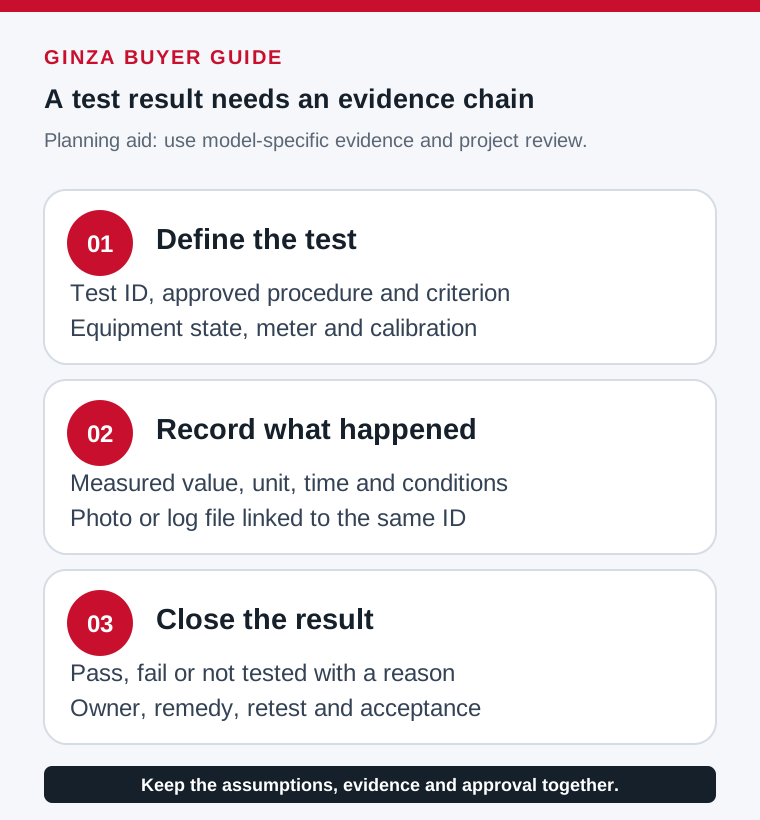
Keep the report traceable to one site and one design revision. Record both a result and the evidence location; a tick without a reading, screenshot or signed test sheet may be hard to verify later.
| Section | Minimum record | Evidence to attach |
|---|---|---|
| Project identity | Site, owner, EPC, commissioning date, drawing revision, grid connection and weather | Approved single-line diagram and as-built drawings |
| Equipment register | PV modules, strings, inverters, batteries, BMS, meters, protection devices and serial numbers | Datasheets, nameplate photos and firmware versions |
| Visual and safety review | Equipment condition, labels, cable support, grounding/bonding, disconnects and access | Photo log and defect list |
| PV electrical tests | String polarity, open-circuit voltage, current and insulation test readings where applicable | Instrument ID, calibration status and test sheets |
| Inverter and grid settings | Model, firmware, protection settings, export limit and utility-approved configuration | Settings export and utility permission |
| Battery and BMS tests | Pack voltage, state of charge, temperature, alarms, communication and charge/discharge behavior | BMS logs, screenshots and manufacturer-specific procedure |
| Functional and monitoring tests | Start/stop, loss-of-grid behavior where relevant, alarms, telemetry and data visibility | Test script, screenshots and timestamped results |
| Acceptance and handover | Pass/fail, deviations, remedial owner, retest date, training and signatures | Punch list, O&M package and signed acceptance |
Copyable report header and test record
Copy these fields into your project document or spreadsheet. Define the acceptance limits from the approved design and manufacturer documentation before testing. Do not copy a generic threshold into a live electrical test.
| Report field | Entry |
|---|---|
| Project / site / owner | ____________________________ |
| System type and rating | PV ____ kWp; inverter ____ kW; battery ____ kWh nominal / ____ kWh usable |
| Approved drawings / revision | ____________________________ |
| Equipment model / serial / firmware | ____________________________ |
| Test date, ambient conditions and personnel | ____________________________ |
| Test ID and instrument / calibration | ____________________________ |
| Procedure and acceptance criterion | ____________________________ |
| Measured result / evidence file | ____________________________ |
| Pass / fail / not tested and reason | ____________________________ |
| Open issue, owner and retest date | ____________________________ |
| Commissioning lead / owner signatures | ____________________________ |
PV-specific records to avoid leaving blank
Map each string to its as-built location. Record the expected range and the measured polarity, voltage and current under the actual test conditions. Save the meter and insulation test records with the instrument details. Document protection settings, inverter startup, monitoring access and any utility witness test. A measured value is meaningful only when the design basis, irradiance and equipment state are known.
The U.S. Department of Energy recommends system documentation, array testing and whole-system performance testing for commercial and utility PV commissioning. NREL’s commissioning checklist also calls for drawings, equipment specifications, visual inspection and electrical review. Use the applicable local standard and engineer-approved procedure for your site.
Battery and hybrid-system records
A hybrid system needs a separate battery record. Capture pack count and configuration, nominal and usable energy, BMS/inverter model and firmware, charge/discharge limits, communication method, alarm response and observed behavior during a controlled functional test. Record the state of charge and temperature when the test starts. If an emergency shutdown or loss-of-grid test applies, note the approved procedure, observed sequence and restoration steps.
Compatibility is model- and firmware-specific. Obtain written confirmation for the proposed inverter, battery configuration and communication protocol; see the battery and inverter compatibility guide. For battery selection, compare the 51.2V LiFePO4 models and send the exact product and inverter details before ordering.
Close the punch list before final acceptance
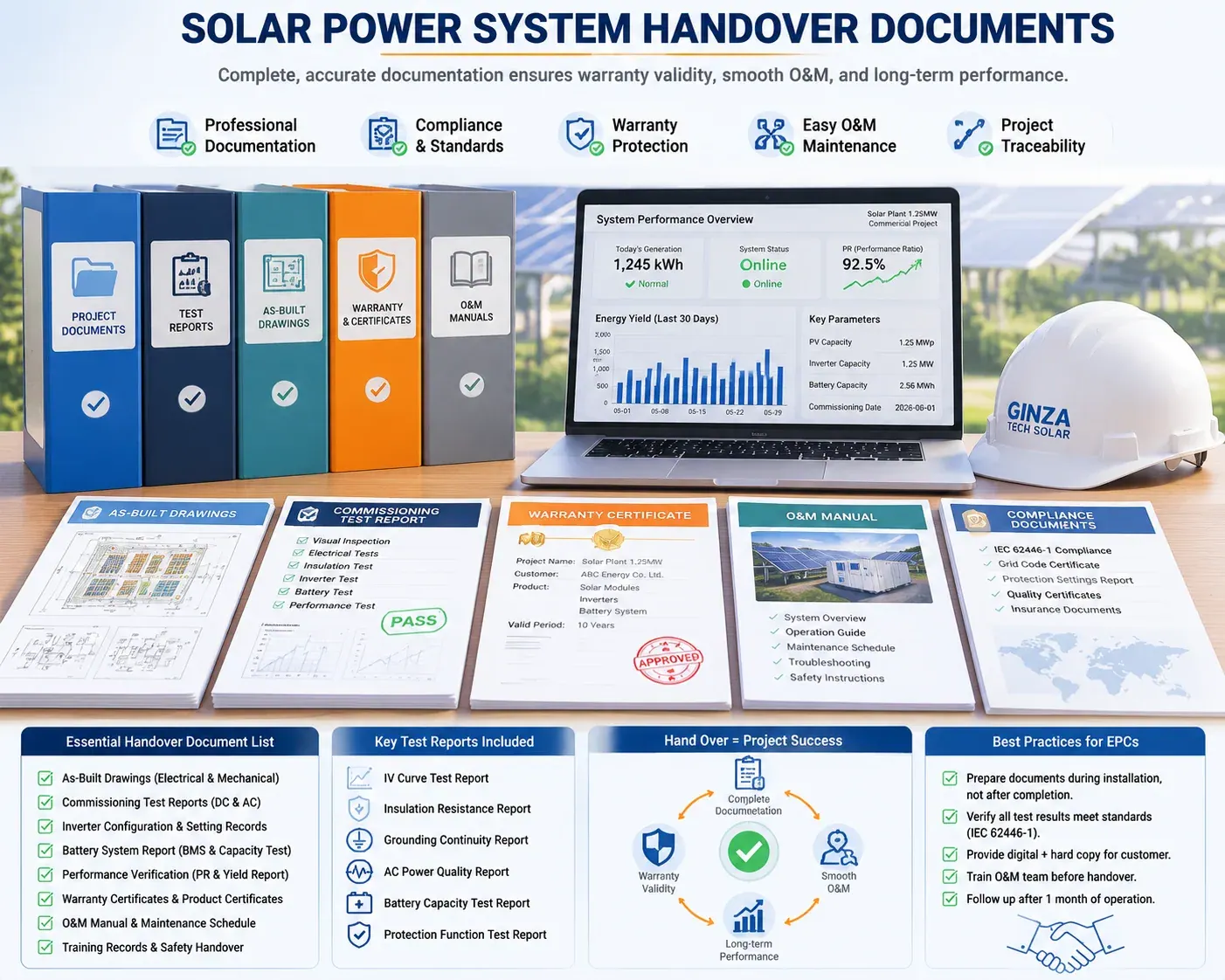
Separate safety or regulatory blockers from performance issues and cosmetic items. Every open issue needs an owner, evidence, due date and retest result. If conditional handover is permitted by the contract, record its limits explicitly. Include as-built drawings, manuals, warranties, safety instructions, monitoring credentials, training record and an O&M contact path in the handover package.
Worked record: one test, one criterion, one evidence trail
A test row should let another engineer understand the result without relying on the person who performed it. Give the row a unique ID, identify the approved procedure and its revision, state the equipment and operating condition, record the observed value and unit, and link the supporting file. The acceptance criterion should already be agreed; it should not be selected after seeing the result.
| Record field | Illustrative entry | Why it belongs |
|---|---|---|
| Test identifier | COM-BAT-014 | Connects the report, photograph and log |
| Purpose | Verify the agreed battery charge-limit response | States the behavior being checked |
| Procedure and criterion | Approved procedure and expected response attached | Avoids a generic threshold |
| Actual observation | Timestamped requested and observed limits saved | Preserves evidence instead of a bare tick |
| Disposition | Pass, fail or not tested; reviewer and date | Makes acceptance traceable |
The entries above are a record format, not instructions for a live electrical test. Test selection, safe isolation, instruments and limits must come from the approved project procedure and equipment manuals. Avoid printing a generic voltage or insulation threshold in every report when the equipment, test method and local requirements differ.
Record a failed test without losing the history
Suppose monitoring communication is unavailable during the scheduled test. Mark the test “not tested” or “failed” according to the agreed procedure, describe the actual condition, identify the affected functions and assign a responsible party. Keep the original record. After correction, issue a retest record with a new timestamp that refers back to the original test ID and the corrective action. Do not overwrite the first result with a green pass.
A project can have a staged handover if the contract and responsible parties permit it, but the report must state exactly which functions remain open and whether operation is restricted. The commissioning lead, owner and relevant designer should agree the disposition. A signed cover page should not conceal an incomplete utility interface, protection setting or battery function.
Use an evidence folder that survives staff changes
Choose a simple file convention such as project-testID-date-revision. Store the approved drawings, equipment and serial register, firmware and settings exports, instrument details, photographs, raw test logs, result sheets and punch list under the same project identifier. The exact naming scheme is less important than consistency and a report index that resolves to the files actually delivered.
Before handing the folder to the owner, have someone who did not create the report open a sample of the referenced files. Check that timestamps agree, images identify the equipment, spreadsheet units are explicit, the settings export belongs to the installed device and the file is readable outside the commissioning laptop. A broken evidence link makes an otherwise detailed report hard to audit.
Separate installation checks, functions and performance
An installation inspection records what was built and whether it matches the approved documentation. A functional test records how a device or system responded to a defined condition. A performance test measures an agreed output under stated conditions. Keep those questions distinct. A clean visual inspection does not demonstrate usable battery energy; a short discharge does not prove annual energy yield; successful monitoring does not establish every protection function.
If performance is part of acceptance, attach its own method, meter boundary, operating window, uncertainty or tolerance treatment, and exclusion rules. Use the BESS usable-energy test guide to prepare the energy record. Link the report to the original RFQ acceptance schedule so the test team is measuring the requirement that was purchased.
Complete the owner’s handover, not only the test sheets
The owner needs the as-built single-line diagram and layout, equipment schedule, operating and emergency instructions, maintenance responsibilities, warranty and service contacts, monitoring access, training record and unresolved-items register. Transfer account access through the agreed secure process and record that the owner can see the data it needs. The report should identify where each deliverable is stored and who accepted it.
Finish with an acceptance page that names the project revision and scope, lists accepted exceptions, assigns remaining actions and records the commissioning lead and owner signatures. Keep the date of each retest and final closeout. This turns a commissioning report into a usable operating record rather than a document produced solely to obtain a signature.
Frequently asked questions
Is a commissioning checklist the same as a report?
No. A checklist lists activities. The report records project-specific results, deviations, evidence and sign-off.
What if a test cannot be completed?
Mark it “not tested,” record the reason, risk owner and planned retest. Do not mark it as passed.
Can one report cover both PV and battery equipment?
Yes, if the battery test results and operating limits remain separately traceable. Larger projects may use separate annexes under one handover register.